
Get ready, creators! Adobe just rolled out some fantastic updates across its Creative Cloud suite, focusing heavily on bringing more speed, precision, and smarter AI tools to your favorite photo editing apps, Lightroom and Photoshop. These new features are designed to cut down on editing time and make tricky tasks incredibly simple, perfect for both pros and casual photographers on the go.
Contents
Here’s a quick look at the highlights:
- Scene Enhance in Lightroom Mobile/Web for instant landscape improvements.
- AI Reflection Removal available everywhere Lightroom is.
- One-Click People Removal for easy cleanups.
- Upcoming AI Photo Filtering to help you find your best shots faster.
- Boosted Select Subject/Remove Background performance in Photoshop.
Quick Fixes for Landscapes: Scene Enhance in Lightroom Mobile & Web
Ever wish you could make your landscape photos pop with just one tap? Lightroom on mobile (iOS and Android) and the web version now have a “Scene Enhance” option under “Quick Actions.” This smart tool analyzes your photo, understands different elements like the sky, water, and ground, and applies targeted edits to make each part look its best, giving your scenic shots an instant boost without complex manual adjustments.
 A couple stands on a rock by a mountain lake; the left side of the image is dull, while the right side is brighter with enhanced colors. Overlay menu options read: Quick Actions, Scene Enhance, Retouch, and Pop.
Say Goodbye to Glare: AI Reflection Removal Arrives
That annoying reflection in the window or on a storefront can ruin a perfect shot. Good news! Adobe’s highly anticipated Reflection Removal tool, first shown off last year, is now available to everyone using Lightroom, Lightroom Classic, Lightroom on mobile, Lightroom for web, and Adobe Camera Raw. Powered by AI, it intelligently detects and removes reflections from glass. If you still want a hint of reflection, there’s even a slider to adjust the strength. This is a game-changer for travel and street photography.
 A young girl with long dark hair, wearing a yellow and white floral dress, sits smiling and looking up while behind a window with white grid panes. Reflections and outdoor scenery are visible on the glass.
Effortless Photo Cleanup: One-Click People Removal
Using the power of Generative Remove, there’s a new tool that can automatically spot people who aren’t the main subject in your photo and remove them with just one click. No more painstaking selections or cloning out distractions. It’s a super-fast way to tidy up your images and keep the focus exactly where you want it.
Find Your Best Shots Faster: AI-Assisted Photo Filtering (Coming Soon)
Sorting through hundreds or thousands of photos after a shoot can take hours. Adobe is teasing a major time-saving feature coming soon to Lightroom and Lightroom Classic: AI-powered filters that help you quickly identify your best images. Imagine filters like “subject focus,” “eyes focus,” and even “eyes open” detection.
These smart filters could help photographers, especially those shooting events or weddings, drastically reduce the time spent reviewing photos. The AI might also help group similar images or suggest unwanted ones for easy cleanup. While we don’t have a release date yet, features like this usually hit public beta fairly quickly after being announced.
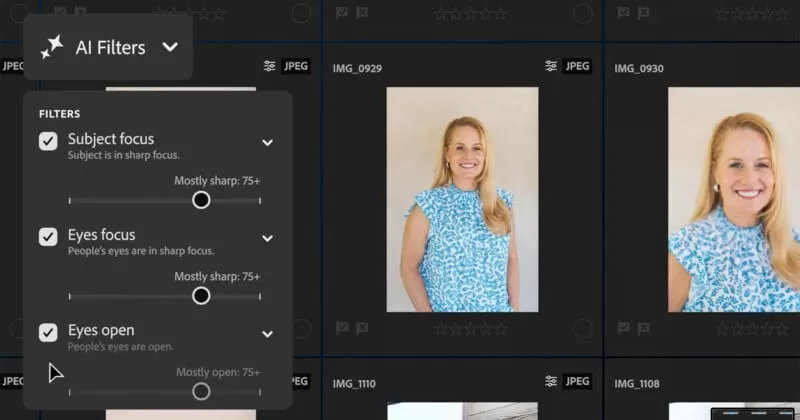 A computer screen shows a photo management software with AI filter options for subject focus, eyes focus, and eyes open. A thumbnail of a smiling blonde woman in a blue patterned blouse is highlighted.
Photoshop Gets Smarter & Faster Too
Over in Photoshop, creators get a handy new Dynamic Text feature for easily adjusting type within bounding boxes. More importantly for photo editors, the popular Select Subject and Remove Background tools are getting a significant performance boost. Thanks to enhanced cloud processing, these AI-powered selection tools promise to be much faster and more accurate than before, making composites and background swaps quicker and cleaner.
Adobe also announced updates for other Creative Cloud apps like Illustrator and its Firefly generative AI service, showing a broad push for more efficient and intelligent creative workflows across the board.
These latest updates from Adobe bring powerful AI tools right to your fingertips, whether you’re editing on your phone, tablet, or desktop. From instantly enhancing landscapes and zapping unwanted reflections to effortlessly removing distractions and potentially speeding up your photo culling process dramatically, these features aim to save you time and make achieving great results easier than ever.






















