
Google is rolling out a vibrant new look for its popular Gmail and Google Messages apps. This fresh style, known as Material 3 Expressive, was recently announced as part of the upcoming Android 16 update, but it’s already showing up for some users ahead of the official OS release. Get ready for more color, bolder elements, and a more dynamic feel in your favorite communication apps.
Contents
Key Takeaways:
- Early Rollout: Google’s new Material 3 Expressive design is appearing in Gmail and Google Messages before the full Android 16 launch.
- Vibrant Look: Expect more colorful buttons, attention-grabbing fonts, and redesigned elements.
- Improved Usability: Changes aim to make key parts of the interface stand out and feel more dynamic.
- Server-Side Update: These changes are arriving via app updates and server-side tweaks, not the main OS update.
What is Material 3 Expressive?
Think of Material 3 Expressive as the next evolution of Google’s design language. While the current Material You focuses on personalization through color extraction from your wallpaper, Expressive takes things a step further. It uses bolder colors, more distinct shapes, and dynamic animations to make certain parts of an app’s interface pop and feel more… well, expressive!
This new design isn’t just for the core Android system; Google intends for apps to adopt it too. Now, it seems their own apps are getting a head start.
Gmail Gets a Colorful Refresh
Reports indicate that some users running a recent beta version of the Gmail app are seeing the new Material 3 Expressive elements.
The changes are noticeable. The search bar at the top looks wider, and interestingly, your profile picture/account switcher is now integrated directly into this wider bar. The “Compose” button, usually a simple floating circle, takes on a bolder, more colorful appearance that immediately catches your eye.
 Gmail app showing Material 3 Expressive design with wider search bar and colorful compose button
Looking at your email list, individual emails might appear in a more defined, card-like structure. Swipe actions (like swiping to archive or delete an email) also get a visual upgrade with new “pill-shaped” elastic animations that make the interaction feel more fluid and responsive. Adjacent emails also show a cool “sticky” effect as you swipe one away.
Google Messages Joins the Expressive Trend
Google Messages isn’t left out. The new design is also being spotted in beta versions of the messaging app.
One key visual change here is how the main chat thread area seems slightly separated from the top bar and the text input field, creating clearer visual zones. When you tap to access emojis, GIFs, or stickers, the menu appears with distinct, connected tabs. The currently selected tab highlights in a prominent “pill” shape with a darker background, making it super clear which category you’re browsing.
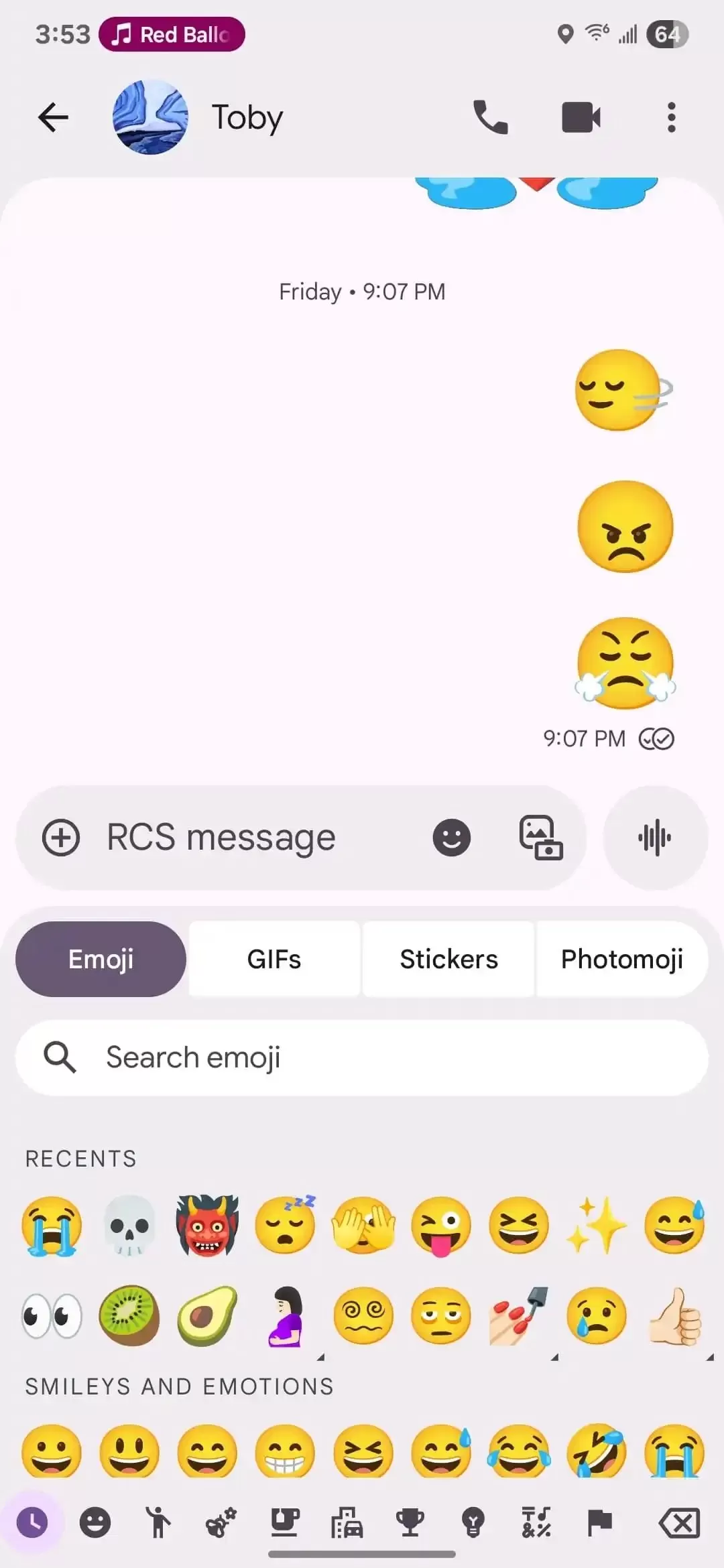 Google Messages app displaying Material 3 Expressive design with pill-shaped tabs and colorful attachment menu
The menu you access via the “Plus” button to add attachments also gets the Material 3 Expressive treatment. It uses bolder colors for the overall background, while individual button icons within the menu have a lighter shade, creating a nice contrast. Aside from these visual tweaks to specific menus, the main chat list view seems largely unchanged for now.
Rolling Out Gradually
It’s important to note that these changes are currently appearing for a limited number of users, likely as part of a public beta test or a gradual server-side rollout by Google. You might not see them on your device immediately.
Since Gmail and Google Messages are standard apps on many Android phones, including Galaxy devices, expect these design updates to eventually reach a wider audience. They could potentially appear for users participating in beta programs like One UI 8 or simply arrive through standard app updates over time.
This early rollout gives us a peek at how Google plans to make its apps feel more dynamic and visually engaging using the Material 3 Expressive design language, even before the underlying operating system fully adopts it.






















