
Google is rolling out a small but noticeable design tweak to its Pixel Weather app, specifically changing how the weather map controls look. This update makes the map view cleaner and more consistent with other large-screen Pixel devices, improving the overall user experience.
The Pixel Weather app is already a big step up from older versions (remember Froggy?), packed with useful information. It gives you detailed hourly and 10-day forecasts, plus specifics like wind speed, precipitation chances, visibility, UV index, humidity, and even air quality. It’s a handy tool whether you’re checking the weather at home or planning a trip elsewhere.
 Pixel Weather app icon displayed on a smartphone screen.
Beyond just showing numbers, the app features a weather map with radar data. This map lets you see expected rain or snow in your area over the next six hours. You can pinch to zoom in for a close-up view or zoom out to see a wider region, with different colors indicating the intensity of precipitation.
Now, the tweak: Google has redesigned the controls at the bottom of this map. Previously, these controls for time, play/pause, and the timeline appeared in a solid “bottom sheet” that covered part of the map. The new design changes this to a “floating card.”
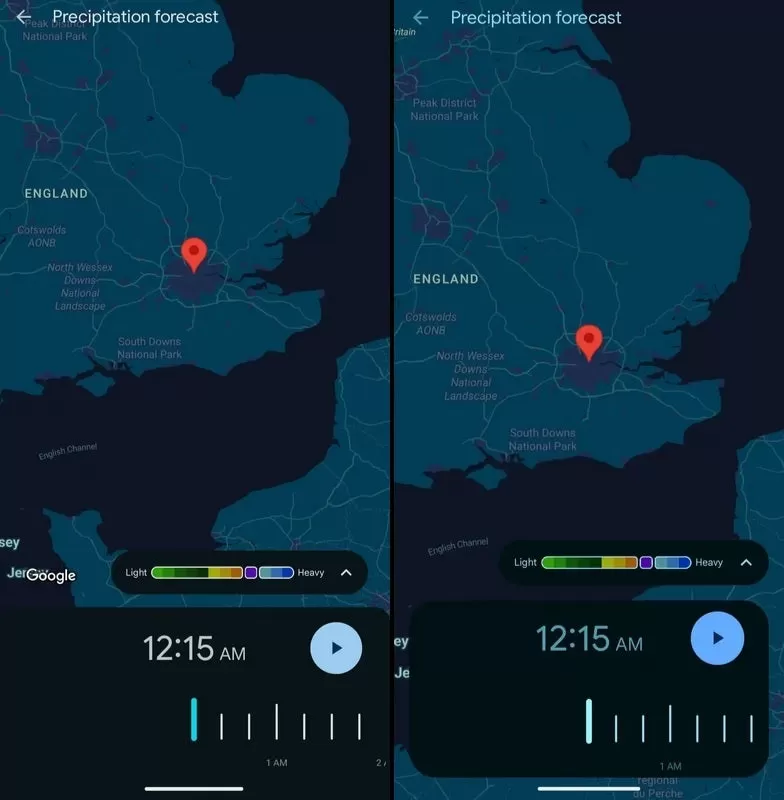 Comparison showing the old Pixel Weather map interface (left) with the new floating card design (right).
This floating card sits slightly above the bottom edge, allowing you to see parts of the map underneath it on the left, right, and bottom sides. It’s a subtle visual change, but it makes the map feel less obstructed and generally looks nicer.
While this might seem like a minor detail, it serves a couple of purposes. Firstly, it simply improves the aesthetic of the map view, making the app feel a bit more polished. Secondly, and perhaps more importantly for Google, it brings the look of the weather map on regular Pixel phones in line with how it appears on larger devices like the Pixel Tablet and Pixel Fold, which already used this floating card style. This creates a more consistent experience across different Pixel devices.
The updated map design is part of Pixel Weather app version 1.0.20250408.758982743, which has been rolling out recently. It’s a good example of how small design refinements can make an app feel better to use day-to-day.
You can get the Pixel Weather app from the Google Play Store if you don’t have it already. This small visual update won’t change how the weather affects your day, but it might make checking the forecast a slightly more pleasant experience.
If you’re interested in more Pixel features or other app updates, check out our related articles!






















