
Feeling overwhelmed by mountains of information? Google’s NotebookLM is a smart AI tool designed to help you make sense of complex topics by organizing and summarizing your sources. It’s been a hit on desktops for students, writers, and anyone dealing with lots of notes or documents, helping connect scattered ideas and build knowledge. Now, this powerful tool is available as a dedicated mobile app for Android and iOS, bringing its capabilities right to your smartphone or tablet. While the mobile app focuses on core features, it offers some incredibly practical ways to interact with your research, like creating AI-powered podcasts, asking questions on the fly, and easily adding content from other apps. If you’re juggling research or just want a smarter way to manage personal information, NotebookLM on mobile is definitely worth exploring.
Contents
- Get Started: Download and Set Up
- Beyond Research: Create a Personal “Life Notebook”
- Build a Comprehensive Knowledge Base
- Listen to Your Notes: Generate AI Podcasts
- Direct the Conversation: Focus on Specific Interests
- Visualize Information Differently: Experiment with Formats
- Bonus Tip: Fuel Your Creativity
Here’s a breakdown of how to get the most out of the NotebookLM app:
Get Started: Download and Set Up
First things first, you’ll need the app. Head over to the App Store for iOS or Google Play for Android and download the Google NotebookLM app. Once installed, you can dive in and start creating your notebooks.
Beyond Research: Create a Personal “Life Notebook”
NotebookLM is fantastic for tackling specific research projects or complex subjects – that’s its main superpower. However, don’t limit yourself! Think about creating a dedicated notebook for your daily life.
You can tap “Create New” and start building a knowledge base for everything from hobbies and chores to grocery lists, project ideas, event plans, and recurring tasks. Imagine having an easily searchable and interactive record of your personal world. Over time, this notebook becomes a growing, personal reference library.
This approach transforms NotebookLM into a kind of personal AI assistant. You could ask it to help generate recipes based on your notes, suggest time-saving ideas from your routines, create schedules, help organize trips, and much more, all drawing from your own information.
 Mobile phone screen showing the Google NotebookLM app interface with different notebook categories like 'Home life' and 'Reading List'
Build a Comprehensive Knowledge Base
When working on a specific project or topic, the key to NotebookLM’s power is feeding it information. Start by pulling together all your relevant sources: web articles, PDFs, transcripts of YouTube videos, key documents, and notes. Add everything related to your topic into a single notebook before you start asking questions.
You can add sources directly within the NotebookLM app by selecting “Add a source,” or even more conveniently, use the standard “Share” icon from almost any other app on your phone to send content straight to a NotebookLM notebook. This effectively lets you build your own highly focused, personal search engine for your specific topic.
The more information you include (up to the current limit of 50 sources), the better NotebookLM becomes at finding connections, identifying patterns, and providing comprehensive answers drawn directly from your uploaded material. When you ask a question, you can trust the response is grounded in the sources you provided.
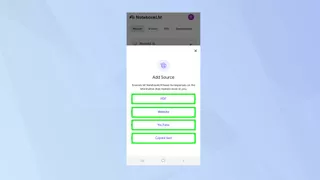 The NotebookLM mobile interface showing options to add sources, including documents and web links
Listen to Your Notes: Generate AI Podcasts
Gathering lots of information is great, but figuring out where to start can be daunting. While NotebookLM can summarize content in text, sometimes hearing it explained makes a bigger difference. The mobile app offers a cool feature: generating an AI-driven podcast based on your sources.
Simply open your notebook, tap “Studio,” then “Audio Overview,” and select “Generate.” After a few minutes, you’ll have a deep-dive discussion about your sources, led by two AI presenters. It’s a unique way to quickly grasp the main themes and ideas in your research. You can even download the audio to listen offline.
The AI hosts discuss different aspects of your topic in an engaging way. Plus, you can interrupt and ask questions whenever you like, even using your voice. There’s even a beta option to “Join” the conversation, making it feel a bit like participating in a live call-in show.
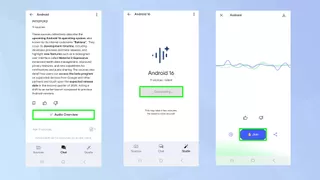 Screenshot of the NotebookLM app showing the "Studio" and "Audio Overview" options to generate a podcast
Direct the Conversation: Focus on Specific Interests
If you’re listening to the AI podcast or chatting with NotebookLM, you don’t have to just let it wander through your sources. You can guide the AI to focus on a particular angle or question.
For instance, if your notebook is about a complex historical event, you could ask NotebookLM (either in the chat or by directing the podcast) to “focus specifically on the economic impacts” or “explain the key figures involved.” This lets you quickly drill down into the parts of your research that matter most to you right now.
This targeted approach saves time and helps you get precise insights from your gathered information, whether you prefer a spoken overview or a written chat summary.
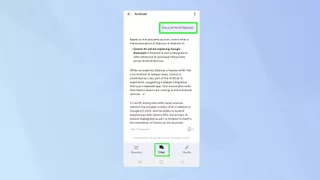 A hand holding a smartphone displaying the NotebookLM app with a conversation thread and the option to ask a question
Visualize Information Differently: Experiment with Formats
NotebookLM is built to be flexible in how it presents information. Don’t just stick to summaries or chat conversations. Ask it to present your source material in different, helpful formats.
You could ask NotebookLM to analyze your sources and generate a clear FAQ (Frequently Asked Questions) based on the most common themes. Or, if your topic involves dates and events, request a timeline to see the information chronologically.
This flexibility makes NotebookLM a powerful study aid or learning tool. When it provides information, it always allows you to trace it back to the original source document you uploaded, perfect for verifying facts or digging deeper.
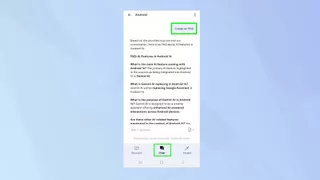 NotebookLM mobile app showing different ways information can be presented, like FAQs or summaries
Bonus Tip: Fuel Your Creativity
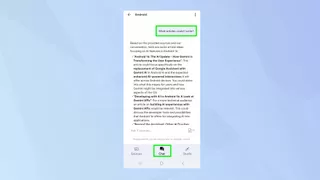
While often seen as a research or study tool, NotebookLM can be a fantastic partner for creative projects. Working on a novel? Upload your draft or notes, and NotebookLM can help you track character details, summarize plot points, or even identify inconsistencies.
It’s also a great tool for brainstorming. If you’re facing writer’s block, ask NotebookLM based on your notes to suggest different story paths, help develop ideas, or even offer ways to improve your writing style. You can experiment with asking it to rewrite text in a different tone, generate song lyrics based on themes, suggest names for characters or projects, and much more. It can act as a creative co-pilot, offering new perspectives drawn from your own work and sources.
 Mobile screenshot showing a NotebookLM chat focused on creative writing, suggesting ideas
Now that you’ve got these tips for using Google’s AI-powered NotebookLM app on your phone, you’re ready to tackle research, organize your life, and even boost your creative projects with a smart digital assistant.
Looking to explore more AI tools from Google? Check out these five versatile uses for Google’s Gemini-powered research companion. You can also learn about accessing even more features with NotebookLM Plus, which is part of the Google One AI Premium subscription plan. If you’re interested in using Google Gemini for other tasks, explore 9 useful prompts to get you started.






















