
Bluesky, the decentralized social network, just rolled out some significant updates to its notification system. This is great news for anyone who feels overwhelmed by alerts and wants more control over what pops up on their phone. Essentially, Bluesky is giving users more power to personalize their notification experience, helping you cut through the noise and focus on what truly matters to you.
Contents
Here’s the lowdown on what’s new and why it’s a game-changer for staying connected without feeling spammed:
Why More Notification Control Matters
Think about your current social media notifications – sometimes it feels like you get alerts for everything. A like here, a random reply there, a repost… it adds up quickly and can make your notification center a chaotic place. Bluesky’s latest move is designed to tackle this head-on. By allowing users to fine-tune their alerts, the platform becomes a more pleasant and manageable space, tailored specifically to your interests and interactions.
Dive into the New Notification Settings
The core of these updates lies in the enhanced controls available within your Settings menu. You can now dictate exactly what kind of activity triggers an alert for you.
Head to Settings and then Notifications to explore the options. You’ll find granular controls for various interactions:
- New followers: Get notified when someone new starts following you.
- Likes: Choose whether to see alerts for likes on your posts.
- Replies: Decide if you want to know every time someone replies to you.
- Mentions: Get alerted when someone tags your username in a post.
- Quotes: Find out when someone quotes your post in theirs.
- Reposts: See when your content gets reposted.
- Everything Else: This catches general alerts like someone joining via a Starter Pack or verification notices.
For each of these categories, you can set who triggers the notification:
- Everyone: You’ll get alerts for this action from any user on Bluesky.
- People you follow only: Only receive alerts for this action from accounts you are following.
- Off: Disable notifications for this specific type of activity entirely.
This level of detail lets you build a notification strategy that fits how you use Bluesky. Maybe you only want to see replies from people you follow, but you’re happy to see mentions from anyone. Now you can set that up easily.
 Bluesky notification settings menu showing various customizable options like likes, replies, and reposts with toggles
One particularly useful addition is the ability to get notifications when someone likes your repost or reposts content you’ve shared. This is especially helpful for users who frequently share content from others, making them feel more included and engaged in the conversation happening around the content they amplify.
Getting Alerts for Specific Accounts
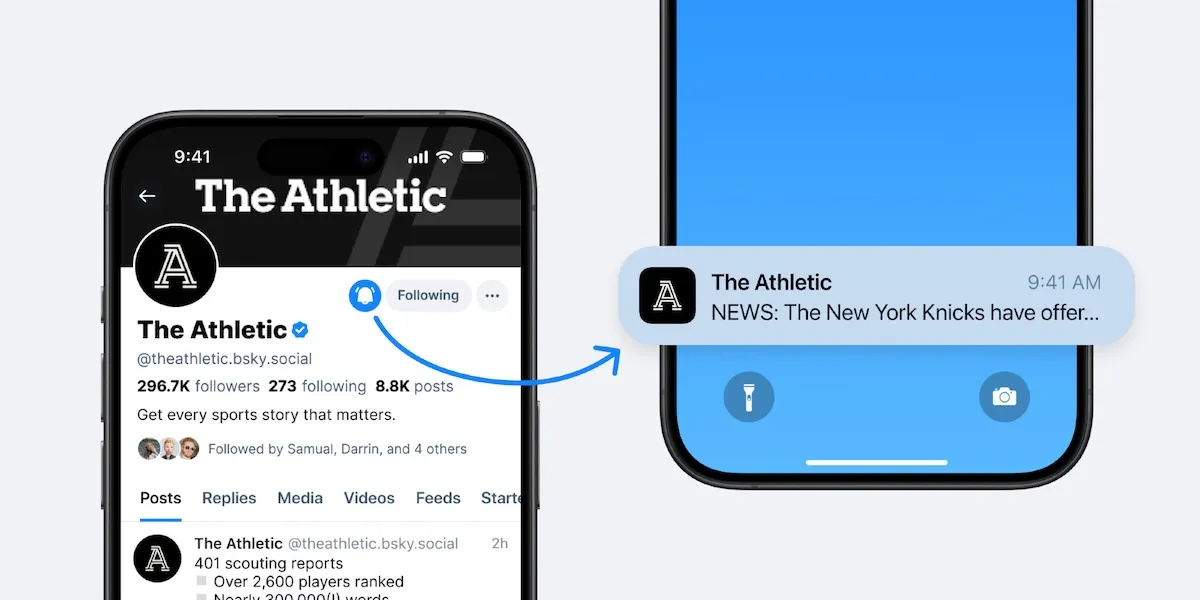
Perhaps the most anticipated feature is the ability to receive notifications whenever a specific account posts something new or replies. This is similar to features found on other platforms like X (formerly Twitter) and Threads, and it’s perfect for following your favorite creators, news sources, or friends very closely.
Here’s how to turn on activity notifications for a particular profile:
- Go to the profile page of the account you want to follow closely.
- Tap the bell icon located right next to the “Follow” button.
- You’ll likely see options here, including getting notifications for new posts from this account. There might also be a separate option just for replies from this account.
Once enabled, you’ll get alerts whenever that account publishes a new post or replies to one. You can manage the list of accounts you’ve enabled activity notifications for within the main Settings > Notifications menu, removing them if you change your mind.
There is one small detail to note: Account owners have the option to disable this feature for their profile entirely. They can also choose to only allow activity notifications from accounts they follow. So, you might not be able to turn on the bell icon for every account you want.
Replacing ‘Priority Notifications’
Bluesky also updated how its previous “priority notifications” feature works. That older setting simply filtered notifications to only show you updates from accounts you followed. With the new system, you achieve the same result by going into Settings > Notifications and changing the preferences for replies, mentions, and quotes to “people you follow only.” This gives you more control than the old on/off switch.
What This Means for Your Bluesky Experience
These updates make your Bluesky feed and notification center far more manageable and personal. Instead of being bombarded with alerts, you can tailor them to match your actual engagement patterns and interests. Whether you want to follow specific accounts closely, only see interactions from friends you follow, or turn off notifications for certain types of activity completely, Bluesky now offers the tools to create a less noisy and more focused experience.
With these enhanced controls, staying connected on Bluesky becomes less about filtering through clutter and more about seeing the updates and interactions that truly matter to you. It’s a positive step towards making the platform more user-friendly and less overwhelming.






















