
ChatGPT is an incredibly powerful tool, capable of everything from writing code to explaining complex science. But with so much potential and a simple chat interface, it can sometimes be tricky to get the detailed, precise answers you really need. You might find yourself getting generic responses or information that isn’t quite right.
Contents
The good news? There’s a simple trick to make ChatGPT think harder and give you much better results. It’s a prompt I’ve used myself since the early days of ChatGPT, and it consistently improves the quality of the output, working across different models and even other AI chatbots.
Here’s the secret: it’s not just what you ask, but how you set up the conversation.
The Two-Step Prompt Explained
Getting ChatGPT to deliver top-tier responses requires a little preparation. Think of it like asking someone to do a complex task – you wouldn’t just blurt it out. You’d give them some context and ask them to really consider their approach. That’s what this prompt does.
It works in two distinct steps:
Step 1: Prime ChatGPT for Deeper Thinking
Before you ask your actual question, send this specific set of instructions to ChatGPT. This tells the AI how you want it to process your upcoming request.
Here’s the prompt you send first:
I’m going to ask you a question in my next message. Before responding, I want you to think through your answer carefully using all tools and reasoning available to you.
1. Plan silently: Map out the question, consider relevant facts, outline your reasoning path, and note any assumptions or missing information.
2. Verify: Use your internal tools—code interpreter, web search (if available), and data analysis—to fact-check key details and ensure accuracy.
3. Clarify: If the request is ambiguous, pause and ask for clarification before continuing.
4. Respond: Once ready, write a clear, detailed, and well-organized answer.
Do not include your thought process—just provide the best, most accurate answer possible.
Only respond when you’ve done all of the above.
Once you send this, ChatGPT will typically reply, confirming that it’s ready for your query, often with a message like “Okay, I’m ready for your question. Please feel free to send it whenever you’re ready.”
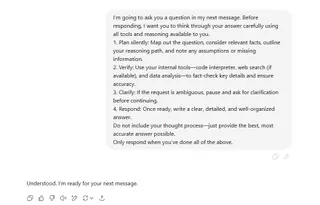 Screenshot of the ChatGPT interface showing the multi-step prompt designed to improve AI responses
Step 2: Ask Your Question
Now that you’ve prepped the AI, simply type your actual question or request in the next message.
Because you sent the priming prompt beforehand, ChatGPT is now instructed to go through a more rigorous internal process. It won’t rush to give you a quick, potentially superficial answer. Instead, it will spend its processing power on planning, checking facts (if it has access to web search or other tools), and ensuring it understands exactly what you need before crafting its final response. This significantly reduces the chance of receiving vague or inaccurate information.
Putting the Prompt to the Test
So, does this extra step actually make a difference? Absolutely.
I tested this by asking ChatGPT to plan a five-day trip to Spain. First, I asked without using the special prompt. Then, I used the two-step method (priming prompt first, then the Spain trip request).
When I used the priming prompt, the difference was clear. ChatGPT leveraged its capabilities (like web search, if available) to dig deeper. The resulting itinerary was much more specific. It included details like popular restaurants to try, links to booking websites, and a breakdown of a potential budget. It felt like a genuinely researched and thoughtful response.
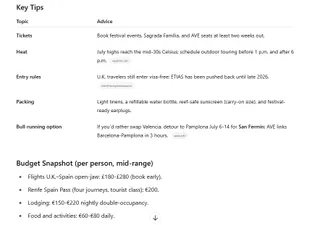 Detailed travel itinerary generated by ChatGPT after using the advanced prompt, demonstrating a complex, well-structured response
Without the priming prompt, ChatGPT still provided a decent five-day itinerary, listing places to visit and explaining why they were worthwhile. However, it lacked the depth and specific, actionable details the primed version provided. It was a good starting point, but not the comprehensive, verified plan I got with the two-step method.
When and Why This Prompt Works Best
This prompt is a game-changer for complex requests where detail, accuracy, and thoroughness are important. Think about tasks like:
- Planning detailed itineraries
- Researching complex topics
- Generating creative content that needs specific constraints
- Debugging code or analyzing data (if using a model with those capabilities)
- Asking for explanations of nuanced subjects
It’s particularly effective with more advanced AI models like GPT-4o, which have better reasoning abilities and access to tools like web browsing and data analysis. These models can truly take advantage of the “plan, verify, clarify” instructions.
However, this prompt isn’t necessary for every single query. If you’re just asking for a quick definition, a simple fact, or how something basic works (like “how does an air fryer cook food?”), the extra priming step won’t add much value. For straightforward questions, a single prompt is perfectly fine.
Conclusion
By adding a simple preparatory step, you can instruct ChatGPT to approach your requests with more care and rigor. This two-step prompt encourages the AI to utilize its full capabilities, leading to more detailed, accurate, and less ambiguous responses, especially for challenging or open-ended tasks. Give it a try the next time you need ChatGPT to go beyond a basic answer and see the difference it makes!






















