
Big news for fans of portable gaming! The popular AYN Odin 2, Odin 2 Mini, and Odin 2 Portal handhelds, known for their powerful Snapdragon 8 Gen 2 chip and Android operating system, can now officially run Linux. This opens up exciting new possibilities for how and what you can play on these devices.
Contents
Why Linux, you ask? While Android is fantastic for many things, bringing a Linux-based custom firmware called ROCKNIX to these specific Snapdragon 8 Gen 2-powered handhelds unlocks enhanced compatibility for certain types of emulation and gives access to a massive library of games you might not easily find on Android.
Why Linux on a High-End Android Handheld?
You might wonder why you wouldn’t just stick with Android, especially when these handhelds pack a punch with the Snapdragon 8 Gen 2. While the latest chips like the Snapdragon 8 Elite are powerful, they can sometimes be too new for existing emulators and ports. Developers need time to optimize their software for brand new hardware. The Snapdragon 8 Gen 2, on the other hand, is a proven performer with excellent support across various software thanks to its maturity in the market.
Compatibility is key for emulation, and that’s where Linux shines. Custom firmwares built on Linux have a long history in the retro gaming handheld scene, often providing more stable and optimized environments for specific emulators and older game ports than a general-purpose OS like Android.
 AYN Odin 2 and Odin 2 Mini with Ayaneo Pocket S
The recent development allowing ROCKNIX on the AYN Odin 2 series leverages the power of the Snapdragon 8 Gen 2 chip within a familiar Linux environment, bringing the best of both worlds for enthusiasts.
Getting Started with ROCKNIX
Bringing Linux to your Odin 2 handheld involves flashing the ROCKNIX custom firmware onto a microSD card. There’s also a small file called a “Linux Loader ABL” that needs to be flashed onto the device itself to allow it to boot from the microSD card instead of its internal storage. While it sounds a bit technical, the steps are well-documented online and manageable if you follow the instructions carefully.
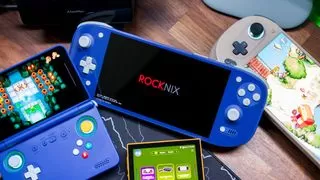 ROCKNIX booting on the AYN Odin 2 Portal
Once installed, you simply insert the microSD card, restart the device, and select the option to boot from the alternative source. A few moments later, you’ll be greeted by a Linux environment tailored for gaming.
What Can You Do With Linux on Odin 2?
This is where the real magic happens. Running ROCKNIX on your Odin 2 handheld unlocks some exciting new gaming possibilities:
Native Xbox Emulation with Xemu
One of the most significant advantages is the ability to natively emulate original Xbox games using the popular Xemu emulator. Forget streaming or trying to run complex Windows layers – you can now potentially play some classic Xbox titles directly on your portable device.
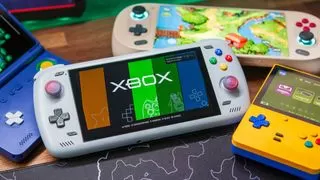 Xbox via Xemu and ROCKNIX on the AYN Odin 2
While PS3 emulation has become more accessible on Android recently, having options like RPCS3 also available within the ROCKNIX environment means you can keep all your high-end emulation in one place without switching operating systems.
Access to PortMaster
Another major draw is support for PortMaster. This platform is a game-changer for handhelds running Linux custom firmware.
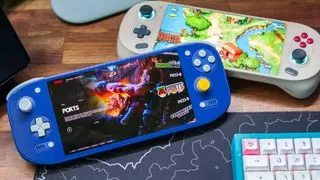 PortMaster Ports via ROCKNIX on the AYN Odin 2 Portal
PortMaster is essentially a tool that simplifies downloading and installing game ports designed for Linux devices. Think of it like a dedicated app store just for older games and indie titles that have been adapted to run natively on Linux handhelds.
The library is extensive, currently boasting over 1,000 titles. Some games, like the Tetris-inspired Apotris, can be downloaded and played immediately. For others, like popular indie hits and classics, you’ll need to own a legitimate copy of the original game and transfer specific files to the device.
 Most Downloaded PortMaster games
Top PortMaster games include fan favorites like Stardew Valley, Half-Life, GTA: Vice City, TMNT: Shredder’s Revenge, and Balatro. While some of these are available on the Google Play Store, many others either aren’t ported to Android at all or are much simpler to set up via PortMaster on a Linux environment.
Is It Worth Trying?
For some users, the extensive emulation and native app support already available on Android might be enough. Android certainly offers unparalleled flexibility with multiple emulators, streaming services, and even Windows compatibility layers like Winlator. Linux on these handhelds doesn’t currently support everything Android does out-of-the-box, such as native Switch emulation via apps like Yuzu or Skyline.
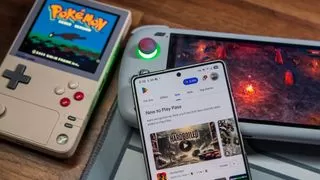 Play Pass on the S25 Ultra with Halls of Torment on the Odin 2 and Pokemon Silver on the Pocket DMG
However, if you own an AYN Odin 2, Odin 2 Mini, or Odin 2 Portal and enjoy tinkering or are specifically interested in native Xbox emulation or the vast PortMaster library, giving ROCKNIX a try is highly recommended.
The beauty of this setup is that the Linux firmware is installed on the microSD card, leaving your existing Android system completely untouched. If you decide it’s not for you, simply power down the device, remove the microSD card, and boot back into Android as usual – no harm done.
The possibility of high-performance Android handhelds also running optimized Linux environments is incredibly exciting for the portable gaming community. While we might still be waiting for devices that perfectly blend the bleeding-edge chips with full Linux driver support, developments like ROCKNIX on the Odin 2 series prove that the community continues to push the boundaries of what’s possible.






















