
Get ready for a little makeover in your favorite simple text editor! Microsoft is rolling out a significant update to Windows Notepad that finally brings text formatting capabilities. Yes, the classic Notepad you know is stepping up its game, adding features like bold and italic text, hyperlinks, and even support for the popular writing format, Markdown.
Contents
This isn’t just a small tweak; it introduces a whole new way to work with Notepad. It’s currently available for folks testing early versions of Windows 11 through the Canary and Dev Channels of the Windows Insider program.
Key Takeaways:
- Windows Notepad now supports text formatting (bold, italic, hyperlinks, lists, headings).
- A new formatting toolbar makes these options easy to access.
- Markdown enthusiasts can work directly in the app and toggle views.
- You can easily clear formatting or disable the feature if you prefer plain text.
- This is part of a rapid evolution for Notepad, following a recent AI text generation feature.
What’s New in Notepad’s Big Update?
For decades, Notepad was the go-to for plain text, no frills attached. But this new update changes that fundamentally. The biggest change is the ability to format text. You can now make words bold, italicize phrases, and even insert clickable hyperlinks directly within the app.
Beyond basic styling, Microsoft is also adding support for lists and headings, making Notepad surprisingly capable for simple document creation or note-taking.
Introducing the New Formatting Toolbar
To make these new features easy to use, Notepad now features a dedicated formatting toolbar located right above the text area, sitting alongside the familiar File, Edit, and View menus. This bar gives you quick access to the bold, italic, and hyperlink options, as well as controls for the new list and heading formats. It’s a simple visual addition that transforms how you interact with the app.
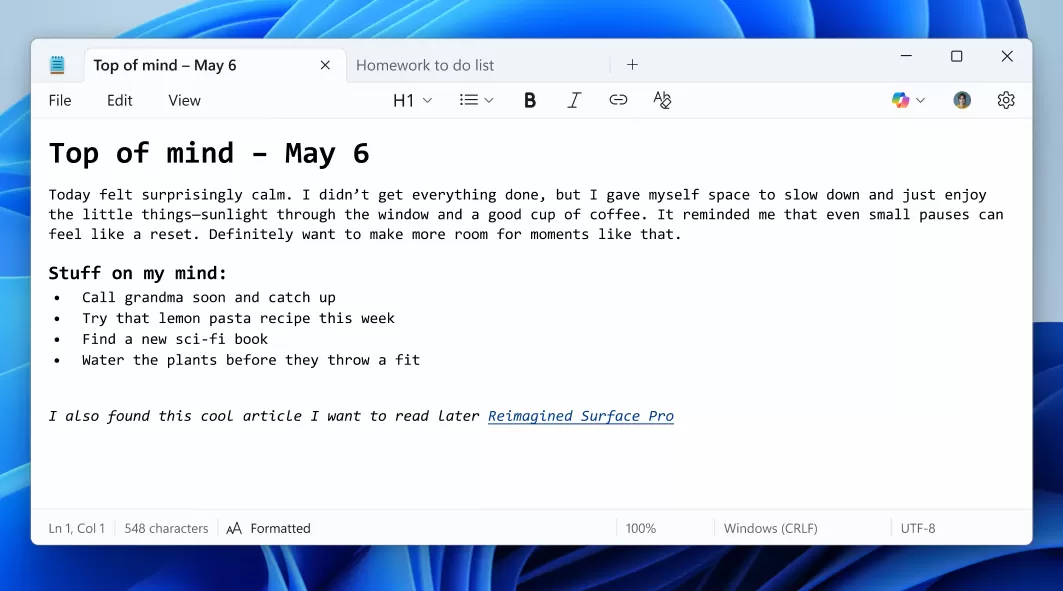 Windows Notepad window showing a new formatting toolbar at the top with options for bold, italic, hyperlink, lists, and headings, alongside formatted Markdown text.
Dive into Markdown
If you’re someone who uses Markdown – that lightweight markup language popular with writers and developers for its simplicity – Notepad now has built-in support. As Dave Grochocki, a principal product manager lead for Windows apps at Microsoft, explains, the experience supports Markdown style input and files.
This means you can type using Markdown syntax (like **bold** or # Heading) and Notepad will understand it. Plus, you get the flexibility to switch between seeing the formatted Markdown text and the raw Markdown syntax view. You can do this through the view menu or a convenient toggle button that appears in the status bar at the bottom of the window.
Keeping it Simple (If You Want To)
While the formatting features are a big addition, Microsoft hasn’t forgotten Notepad’s roots in plain text. If you apply formatting but change your mind, you can easily strip it all away using an option in the formatting toolbar or the Edit menu.
And for the purists who truly just want a plain text editor, the update includes an option in Notepad’s settings to fully disable this new formatting support. Notepad remains Notepad at heart, giving you control over how you use it.
Part of a Bigger Notepad Transformation
This formatting update arrives hot on the heels of another major new feature: generative AI text creation. Just last week, Microsoft started testing a new “Write” feature in Notepad that uses AI to draft text based on your prompts.
Adding AI writing and text formatting in quick succession shows that Microsoft is seriously investing in Notepad’s future. After decades of very little change, the app is rapidly evolving from a basic log file reader into something much more capable, almost blurring the lines with simple word processors. This rapid transformation comes roughly a year after Microsoft decided to remove WordPad from Windows after nearly 30 years, perhaps clearing the path for Notepad to take on more functionality.
Conclusion
The addition of text formatting marks a significant turning point for Windows Notepad. It’s no longer just about plain text; you can now add style, structure, and interactivity with bold, italics, links, and Markdown support. While still simple at its core, these new features make the classic app surprisingly powerful for everyday tasks.
What do you think of Notepad getting these new capabilities? Share your thoughts and explore more about the surprising evolution of built-in Windows apps.






















