Google has quietly released an experimental app called Google AI Edge Gallery on Android, with an iOS version planned, allowing users to download and run various openly available AI models from Hugging Face directly on their smartphones without an internet connection. This new application enables users to perform AI tasks like image generation, text analysis, coding assistance, and answering questions using their phone’s processing power.
Contents
What is Google AI Edge Gallery?
Google AI Edge Gallery serves as a platform for users to discover, download, and execute compatible AI models directly on their mobile devices. It’s designed as an “experimental Alpha release” and provides a gateway to models hosted on platforms like Hugging Face that are optimized for running on edge devices (like smartphones).
Why Run AI Models Offline?
While cloud-based AI models often offer greater computational power, running models locally on a device presents distinct advantages:
- Privacy: Sensitive or personal data used with the AI model remains on the user’s device and is not sent to a remote data center.
- Accessibility: Users can utilize AI capabilities even without a stable Wi-Fi or cellular connection, making it available in remote areas or offline environments.
- Reduced Latency: Processing on the device can sometimes reduce the delay in receiving results compared to sending data to the cloud and back.
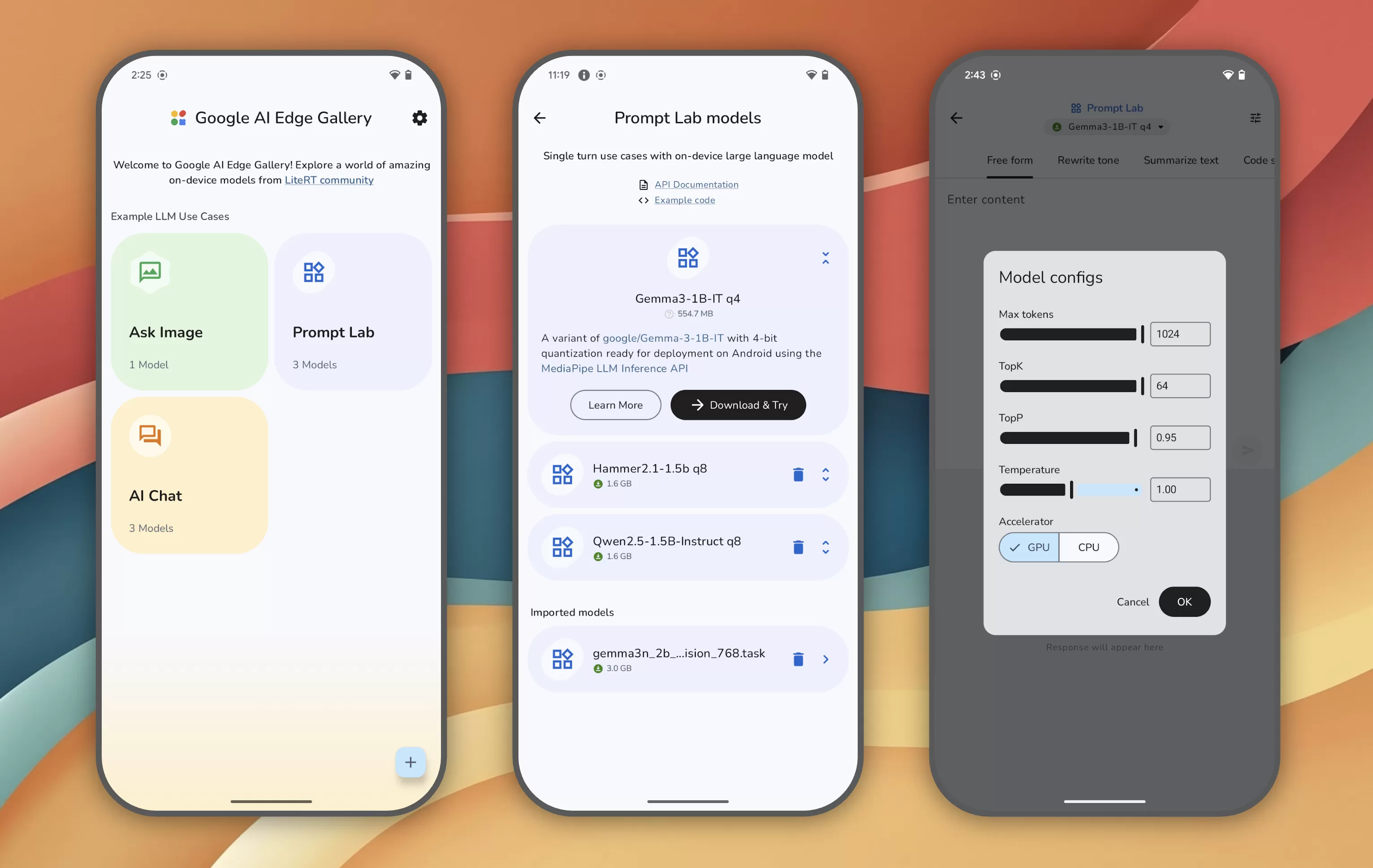 Welcome screens for Google AI Edge Gallery appWelcome screens of the Google AI Edge Gallery Android app showcasing its interface.
How to Access and Use the App
Currently, Google AI Edge Gallery is available for download from GitHub. Users can find instructions and access the application code repository to install it on their Android devices.
Once installed, the app’s home screen offers shortcuts to common AI tasks, such as “Ask Image” or “AI Chat.” Selecting a task displays a list of suitable AI models, including optimized versions of Google’s own models like Gemma 3n, which can run on phones.
The app also includes a “Prompt Lab,” a dedicated area for users to test single-turn AI tasks like summarizing or rewriting text. The Prompt Lab offers task templates and configurable settings to fine-tune the behavior of the selected AI model for specific needs.
Performance Considerations
Google notes that the performance of models within the AI Edge Gallery can vary significantly. The speed and efficiency of running a model offline depend primarily on two factors:
- Device Hardware: Modern smartphones with more powerful processors and dedicated AI acceleration hardware can execute models much faster.
- Model Size: Larger AI models require more computational resources and take longer to process tasks compared to smaller, more streamlined models designed for edge computing.
Developer Engagement
As an experimental alpha release, Google is actively seeking feedback from the developer community. The project is released under an Apache 2.0 license, which permits widespread use, including commercial applications, without significant restrictions. This open approach encourages collaboration and further development of local AI model capabilities.
The release of Google AI Edge Gallery highlights the growing trend towards making artificial intelligence more accessible and private by enabling it to run directly on user devices. While currently experimental, it points towards a future where powerful AI tools are available offline, anytime, anywhere. Explore further details on the technical implementation and potential applications of edge AI.